



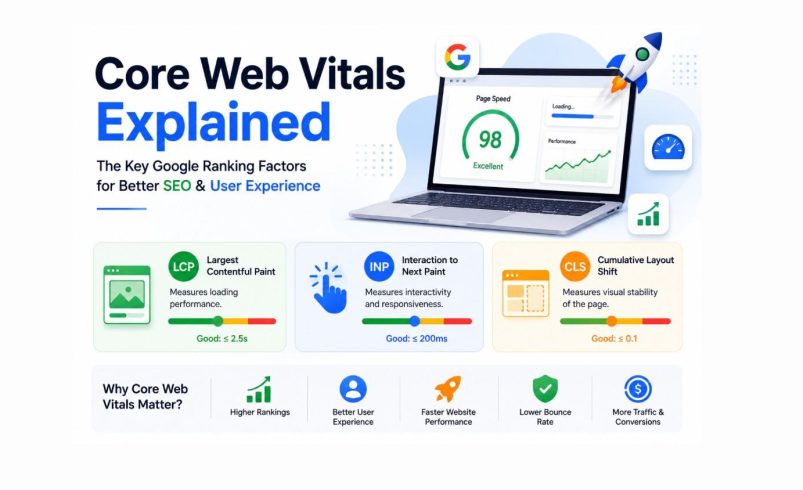
Core Web Vitals are Google’s user experience metrics that measure how quickly a webpage loads, how responsive it feels, and how visually stable it remains during loading. The three Core Web Vitals are Largest Contentful Paint (LCP), Interaction to Next Paint (INP), and Cumulative Layout Shift (CLS).
A website with strong Core Web Vitals typically provides a better user experience, improves engagement, reduces bounce rates, supports SEO performance, and increases conversions. While Core Web Vitals are only one ranking factor, they directly influence how users interact with your website, making them critical for long-term digital growth.
For businesses competing online—whether in Pune, Mumbai, Delhi, Bangalore, or globally—website speed is no longer just a technical concern. It is a revenue, lead generation, and customer experience issue.
What Are Core Web Vitals?
Core Web Vitals are a set of performance metrics developed by Google to measure real-world user experience on websites.
Unlike traditional speed tests that only evaluate technical performance, Core Web Vitals focus on how actual visitors experience a webpage.
Google uses these metrics to understand:
- How fast content appears
- How quickly users can interact
- Whether the page remains visually stable
These measurements come from real users visiting your website across different devices, networks, and locations.
Why Did Google Introduce Core Web Vitals?
For years, website owners focused on keywords and backlinks while often overlooking user experience.
Google recognized that users prefer websites that:
- Load quickly
- Respond instantly
- Feel smooth and stable
As a result, Google introduced Page Experience signals, with Core Web Vitals becoming one of the most important components.
The objective was simple:
Reward websites that provide excellent user experiences while discouraging slow, frustrating websites.
The Three Core Web Vitals Explained
Largest Contentful Paint (LCP)
What Is LCP?
Largest Contentful Paint measures how long it takes for the largest visible content element to appear on a page.
This element could be:
- Hero image
- Banner image
- Featured product image
- Large heading block
Good LCP Score
- Good: Under 2.5 seconds
- Needs Improvement: 2.5–4 seconds
- Poor: Above 4 seconds
Why LCP Matters?
Visitors expect content almost immediately.
If your homepage takes 5–6 seconds to display important content, many users will leave before engaging with your website.
Common Causes of Poor LCP
- Slow web hosting
- Heavy images
- Large page builders
- Excessive CSS and JavaScript
- Unoptimized WordPress themes
Interaction to Next Paint (INP)
What Is INP?
Interaction to Next Paint measures how quickly a website responds when a user interacts with it.
Examples include:
- Clicking a button
- Opening a menu
- Submitting a form
- Adding products to a cart
Google replaced First Input Delay (FID) with INP because it provides a more accurate measurement of overall responsiveness.
Good INP Score
- Good: Under 200 milliseconds
- Needs Improvement: 200–500 milliseconds
- Poor: Above 500 milliseconds
Why INP Matter?
Imagine clicking a “Get Quote” button and waiting several seconds for a response.
Users perceive the website as broken, even if it eventually works.
Poor responsiveness can directly reduce:
- Lead submissions
- Purchases
- Engagement
- User satisfaction
Cumulative Layout Shift (CLS)
What Is CLS?
CLS measures unexpected movement of page elements while loading.
For example:
A visitor attempts to click a button.
Suddenly, an advertisement loads above it and pushes the button downward.
The user accidentally clicks something else.
This creates a frustrating experience.
Good CLS Score
- Good: Below 0.1
- Needs Improvement: 0.1–0.25
- Poor: Above 0.25
Common Causes of Layout Shifts
- Missing image dimensions
- Dynamic advertisements
- Popup banners
- Delayed font loading
- Embedded videos without reserved space
Core Web Vitals Benchmarks Every Website Should Know
|
Metric |
Good |
Needs Improvement |
Poor |
|
LCP |
≤ 2.5s |
2.5s–4s |
> 4s |
|
INP |
≤ 200ms |
200ms–500ms |
> 500ms |
|
CLS |
≤ 0.1 |
0.1–0.25 |
> 0.25 |
Meeting all three benchmarks indicates a strong page experience.
Why Website Speed Matters for SEO?
Is Website Speed a Google Ranking Factor?
Yes.
Google has confirmed that page experience and Core Web Vitals contribute to ranking systems.
However, many businesses misunderstand how this works.
Core Web Vitals alone will not push a poorly optimized page to the top of search results.
Instead, they act as a competitive advantage when content quality, relevance, and authority are similar.
Faster Websites Reduce Bounce Rates
Users are impatient.
Research consistently shows that visitors abandon websites when pages load slowly.
A delay of just a few seconds can significantly impact:
- Session duration
- Pages per visit
- Conversion rates
- Lead generation
Fast websites encourage users to stay longer and engage with more content.
Website Speed Improves Crawl Efficiency
Googlebot has a crawl budget.
When pages load efficiently, search engines can:
- Discover more pages
- Crawl content faster
- Process updates more efficiently
This becomes especially important for:
- Ecommerce websites
- Large service websites
- News websites
- Enterprise portals
How Core Web Vitals Impact Business Growth?
Many business owners view website speed as a technical issue.
In reality, it is a sales and marketing issue.
Lead Generation Websites
For service businesses such as:
- SEO agencies
- Law firms
- Healthcare clinics
- Real estate agencies
Every second of delay can reduce inquiry submissions.
A fast-loading contact form often generates more leads than a slow one.
Ecommerce Websites
For ecommerce stores, speed directly impacts revenue.
When checkout pages lag:
- Cart abandonment increases
- Conversion rates decline
- Customer satisfaction drops
Even small performance improvements can create significant revenue gains over time.
Local Businesses
Local search users often have immediate intent.
Someone searching:
- “SEO agency in Pune“
- “Dental clinic near me”
- “Digital marketing company in Mumbai”
expects instant access to information.
A slow website can lose customers before they even read your services.
Common Website Speed Problems That Hurt Core Web Vitals
Large Unoptimized Images
One of the most common issues.
Modern websites should use:
- WebP
- AVIF
- Responsive image sizing
- Compression techniques
Excessive JavaScript
Many modern websites rely heavily on JavaScript.
Unfortunately, too much JavaScript:
- Delays page rendering
- Slows interactions
- Increases INP
Poor Hosting Infrastructure
Cheap hosting often results in:
- Slow server response
- Resource limitations
- Performance bottlenecks
Hosting quality remains one of the most overlooked speed factors.
Too Many WordPress Plugins
WordPress powers millions of websites, but plugin overload creates problems.
Common issues include:
- Duplicate functionality
- Unnecessary scripts
- Database bloat
- Increased server requests
Render-Blocking Resources
Files that prevent content from displaying quickly include:
- Large CSS files
- Third-party scripts
- Tracking pixels
- Unoptimized themes
How to Measure Core Web Vitals?
Google PageSpeed Insights
The most widely used tool.
It provides:
- Core Web Vitals data
- Performance recommendations
- Mobile and desktop analysis
Google Search Console
The Core Web Vitals report helps identify:
- Poor URLs
- Mobile performance issues
- Site-wide trends
Lighthouse
Ideal for developers seeking deeper technical insights.
GTmetrix
Provides waterfall analysis and advanced speed diagnostics.
WebPageTest
Useful for identifying loading bottlenecks and performance issues.
How to Improve Largest Contentful Paint (LCP)?
Optimize Hero Images
Large homepage banners often cause poor LCP.
Best practices include:
- Compress images
- Convert to WebP
- Resize appropriately
Use a Content Delivery Network (CDN)
A CDN delivers content from servers closer to users.
Benefits include:
- Faster global loading
- Reduced latency
- Improved scalability
Upgrade Hosting
Moving from shared hosting to cloud or managed hosting can significantly improve performance.
How to Improve Interaction to Next Paint (INP)?
Reduce JavaScript Execution
Remove unnecessary scripts.
Audit:
- Tracking codes
- Chat widgets
- Third-party plugins
Break Up Long Tasks
Large JavaScript tasks should be divided into smaller operations.
This improves responsiveness.
Optimize Forms and Interactive Elements
Lead forms should respond instantly to user actions.
How to Improve Cumulative Layout Shift (CLS)?
Set Image Dimensions
Always define:
- Width
- Height
This prevents layout jumps.
Reserve Space for Ads
Advertising containers should have predefined dimensions.
Optimize Font Loading
Use modern font-display strategies to avoid shifting text.
WordPress Optimization Tips for Better Core Web Vitals
If your website uses WordPress, focus on:
Lightweight Themes
Avoid bloated multipurpose themes.
Efficient Page Builders
Optimize Elementor sections and widgets carefully.
Caching Solutions
Use performance tools that generate static pages.
Image Optimization
Compress all uploaded media files.
Database Maintenance
Remove:
- Spam comments
- Post revisions
- Expired transients
CDN Integration
Essential for national and international audiences.
Core Web Vitals and Mobile SEO
Google primarily evaluates websites using mobile-first indexing.
This means mobile performance matters more than ever.
A website may perform perfectly on desktop but still fail Core Web Vitals on mobile devices.
Businesses targeting users in India should pay special attention because mobile internet traffic dominates search activity across cities such as Pune, Mumbai, Bangalore, Hyderabad, Chennai, and Delhi.
Core Web Vitals and Conversion Rate Optimization
Website speed impacts far more than rankings.
It affects:
- Trust
- Engagement
- Lead generation
- Revenue
A fast website creates confidence.
A slow website creates hesitation.
Whether users are booking a consultation, filling out a lead form, or purchasing products, performance directly influences decision-making.
Core Web Vitals Optimization Checklist
✓ Compress images
✓ Use WebP or AVIF formats
✓ Upgrade hosting
✓ Enable caching
✓ Implement a CDN
✓ Minimize JavaScript
✓ Reduce plugin usage
✓ Optimize CSS delivery
✓ Define image dimensions
✓ Monitor Search Console reports
✓ Test mobile performance regularly
✓ Audit third-party scripts quarterly
Need Help Improving Your Core Web Vitals
If your website struggles with slow loading speeds, poor PageSpeed scores, high bounce rates, or declining search visibility, a comprehensive technical SEO and performance audit can identify exactly what’s holding it back.
Our team analyzes Core Web Vitals, server performance, mobile usability, WordPress optimization, image delivery, caching configuration, and user experience metrics to create a practical improvement roadmap that drives faster load times, stronger SEO performance, and better conversion rates.
Contact us today for a detailed website speed audit and discover how performance optimization can help your business generate more traffic, leads, and revenue.
Frequently Asked Questions
What is a good Core Web Vitals score?
A good score means achieving:LCP below 2.5 secondsINP below 200 millisecondsCLS below 0.1
Do Core Web Vitals directly affect SEO rankings?
Yes, but they are one of many ranking signals. Content quality, relevance, backlinks, and user intent remain critical factors.
How often should Core Web Vitals be monitored?
Monthly monitoring is recommended. High-traffic websites should review performance weekly.
Which Core Web Vital is most important?
All three matter, but poor LCP is often the first issue users notice because it directly impacts perceived loading speed.
Can improving Core Web Vitals increase conversions?
Yes. Faster websites generally experience lower bounce rates, better engagement, and higher conversion rates
Are Core Web Vitals important for local SEO?
Absolutely.For businesses targeting local searches such as "SEO agency in Pune," "web development company in Mumbai," or "digital marketing services in PCMC," website speed can influence both user engagement and search visibility.